Which Sticks Work With Your IQOS Device?
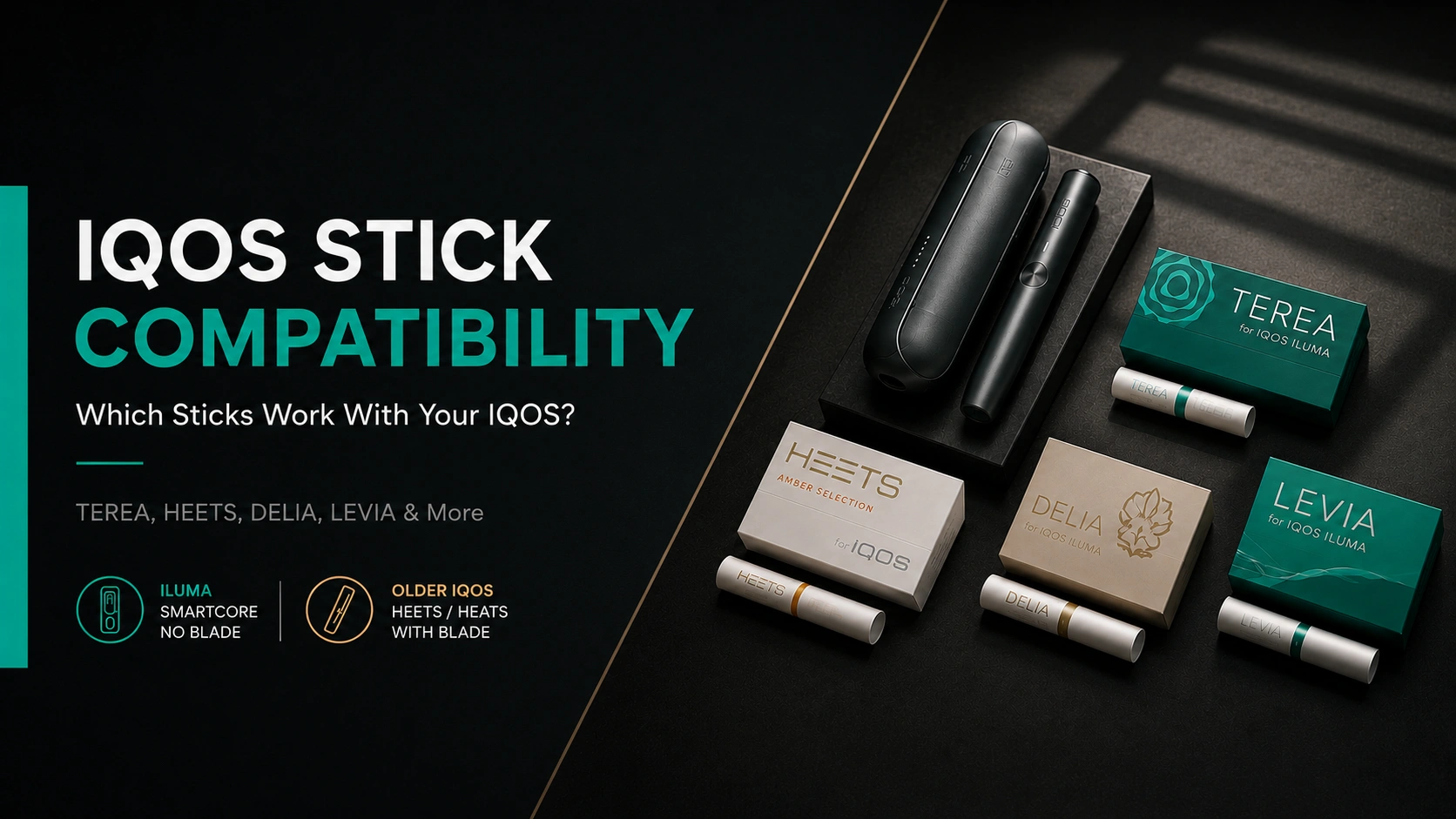
IQOS sticks may look similar, but they are not interchangeable. The correct choice depends on whether your device uses the newer SMARTCORE induction system or an older heating blade.
IQOS ILUMA, ILUMA ONE, ILUMA PRIME and the newer ILUMA i models use SMARTCORE sticks such as TEREA, DELIA and LEVIA. Older IQOS devices equipped with a visible heating blade use HEETS. HEETS will not heat correctly inside an IQOS ILUMA.
This guide covers every major IQOS generation, explains how to identify your device and shows exactly which consumables are safe to use. For a closer comparison of the two main formats, read our TEREA vs HEETS guide .
Already own an ILUMA? Explore all TEREA flavors worldwide , compare the strongest TEREA flavors , or check which flavors are available in your country .
IQOS Device and Stick Compatibility
The easiest rule is simple: all IQOS ILUMA models use SMARTCORE sticks, while IQOS ORIGINALS and older blade-based devices use HEETS.
IQOS ILUMA family
These devices use induction heating and contain no heating blade. They work with sealed SMARTCORE sticks.
Blade-based IQOS family
IQOS ORIGINALS, IQOS 3 and earlier generations contain a ceramic heating blade and are designed for HEETS.
| IQOS device | Heating technology | Compatible sticks | HEETS | SMARTCORE sticks |
|---|---|---|---|---|
| IQOS ILUMA i PRIME | SMARTCORE induction | TEREA, DELIA, LEVIA, SENTIA* | Not compatible | Compatible |
| IQOS ILUMA i | SMARTCORE induction | TEREA, DELIA, LEVIA, SENTIA* | Not compatible | Compatible |
| IQOS ILUMA i ONE | SMARTCORE induction | TEREA, DELIA, LEVIA, SENTIA* | Not compatible | Compatible |
| IQOS ILUMA PRIME | SMARTCORE induction | TEREA, DELIA, LEVIA, SENTIA* | Not compatible | Compatible |
| IQOS ILUMA | SMARTCORE induction | TEREA, DELIA, LEVIA, SENTIA* | Not compatible | Compatible |
| IQOS ILUMA ONE | SMARTCORE induction | TEREA, DELIA, LEVIA, SENTIA* | Not compatible | Compatible |
| IQOS ORIGINALS DUO | Ceramic heating blade | HEETS | Compatible | Not compatible |
| IQOS ORIGINALS ONE | Ceramic heating blade | HEETS | Compatible | Not compatible |
| IQOS 3 DUO | Ceramic heating blade | HEETS | Compatible | Not compatible |
| IQOS 3 MULTI | Ceramic heating blade | HEETS | Compatible | Not compatible |
| IQOS 3 | Ceramic heating blade | HEETS | Compatible | Not compatible |
| IQOS 2.4 PLUS | Ceramic heating blade | HEETS | Compatible | Not compatible |
What does “SMARTCORE sticks” mean?
SMARTCORE sticks contain a metal heating element inside the sealed stick. The IQOS ILUMA induction system heats this element from within, which is why ILUMA devices do not need a traditional heating blade.
The exact brands available depend on the country. TEREA is the most widely available option, DELIA and LEVIA are sold in selected markets, while SENTIA is primarily associated with Japan.
For a detailed breakdown of construction, heating technology and flavor differences, see our complete TEREA vs HEETS comparison .
*Stick brands and product availability vary by market. Always check the packaging and official local IQOS guidance before use.
How to Identify Which IQOS Device You Have
You do not need the original box or receipt. The fastest way to identify your IQOS generation is to look inside the stick chamber and check whether the holder contains a visible heating blade.
Look inside the holder
Remove the cap and inspect the center of the chamber carefully. Do not insert any tools or touch the internal parts.
- No blade visible: you most likely have an IQOS ILUMA or IQOS ILUMA i device.
- Thin ceramic blade visible: you have an older blade-based IQOS model.
Check the device name
The model name may appear on the bottom of the device, inside the pocket charger or in the Bluetooth-connected IQOS application.
- Names containing ILUMA use SMARTCORE sticks.
- Names containing ORIGINALS use HEETS.
- IQOS 3, 3 DUO and 2.4 PLUS also use HEETS.
The 10-second identification rule
No blade means TEREA-style SMARTCORE sticks. A visible blade means HEETS. This distinction is more reliable than identifying the device by color, size or charger shape because many IQOS generations have similar-looking designs.
IQOS ILUMA
A separate holder and pocket charger, but no ceramic blade inside the holder.
IQOS ILUMA ONE
A compact all-in-one device with a single body and a blade-free heating chamber.
Older IQOS
The holder contains a narrow ceramic blade that enters the tobacco plug when a stick is inserted.
Signs you have an ILUMA device
- The heating chamber has no exposed blade.
- The device requires little or no internal cleaning.
- TEREA branding appeared with the device or starter kit.
- The device may display “ILUMA” or “ILUMA i” on its body.
Signs you have a blade device
- A ceramic blade is visible inside the holder.
- The cap can be removed for regular cleaning.
- Tobacco residue may collect around the blade.
- The device was originally supplied with HEETS.
What Is the Difference Between TEREA, DELIA, LEVIA, SENTIA and HEETS?
These names do not describe different IQOS devices. They are separate consumable ranges created for specific heating systems, markets and flavour preferences.
TEREA
TEREA is the main premium tobacco-stick range developed for the IQOS ILUMA family. Each stick is sealed and contains the internal metal heating element required by the SMARTCORE induction system.
- Compatible with: IQOS ILUMA and ILUMA i models
- Contains tobacco: Yes
- Typical range: Tobacco, menthol, aromatic and capsule flavours
- Best for: The widest selection of ILUMA flavours
Start with our ranking of the best TEREA flavors or browse the complete worldwide TEREA flavor guide .
DELIA
DELIA is another sealed tobacco-stick range for IQOS ILUMA. It generally focuses on a smaller, more straightforward selection of familiar tobacco and menthol profiles.
- Compatible with: IQOS ILUMA and ILUMA i models
- Contains tobacco: Yes
- Typical range: Classic tobacco and menthol profiles
- Best for: Simpler flavour choice and familiar profiles
LEVIA
LEVIA is a zero-tobacco nicotine-stick range made for IQOS ILUMA. Instead of traditional tobacco profiles, the range concentrates on fresh, fruity and aromatic flavour combinations.
- Compatible with: IQOS ILUMA and ILUMA i models
- Contains tobacco: No
- Contains nicotine: Yes
- Best for: Users looking beyond tobacco-style flavours
SENTIA
SENTIA is an IQOS ILUMA tobacco-stick line sold mainly in Japan. It offers regular, menthol and aromatic profiles and is positioned as a more accessible alternative within the Japanese ILUMA range.
- Compatible with: IQOS ILUMA and ILUMA i models
- Contains tobacco: Yes
- Main market: Japan
- Best for: ILUMA users shopping in the Japanese market
Where do HEETS fit into the range?
HEETS belong to the previous IQOS generation. They are traditional heated-tobacco sticks made for devices containing a ceramic heating blade, including IQOS ORIGINALS DUO, IQOS 3 DUO, IQOS 3 MULTI and IQOS 2.4 PLUS.
HEETS do not contain the internal metal heating element required by IQOS ILUMA. As a result, an ILUMA device cannot heat them correctly.
| Stick range | Designed for | Tobacco | Internal heating element | Availability |
|---|---|---|---|---|
| TEREA | IQOS ILUMA | Yes | Yes | Widely available across many ILUMA markets |
| DELIA | IQOS ILUMA | Yes | Yes | Selected markets |
| LEVIA | IQOS ILUMA | No | Yes | Selected markets |
| SENTIA | IQOS ILUMA | Yes | Yes | Primarily Japan |
| HEETS | Blade-based IQOS | Yes | No | Varies by country |
Choose TEREA when…
- You own any IQOS ILUMA model.
- You want the widest flavour selection.
- You are comparing multiple strengths and tobacco profiles.
- You need a range sold across several international markets.
Choose another ILUMA range when…
- You prefer DELIA’s smaller, classic selection.
- You want zero-tobacco LEVIA nicotine sticks.
- You are shopping for SENTIA in Japan.
- Your preferred TEREA flavour is unavailable locally.
Our TEREA availability by country guide can help you check which products are commonly offered in individual markets. You can also compare flavour intensity in our guide to the strongest TEREA flavors .
What Happens If You Use the Wrong Stick in an IQOS?
Using an incompatible stick does not improve performance or unlock additional flavours. In most cases, the device will fail to heat the stick correctly, and in some combinations there is a genuine risk of damaging the holder.
TEREA in a blade-based IQOS
TEREA sticks contain a metal heating element inside the tobacco plug. Older IQOS holders already have their own ceramic blade, so the two heating systems are not designed to work together.
- The stick may feel unusually difficult to insert.
- The ceramic blade can press against the internal metal element.
- The holder may not heat the stick correctly.
- The blade can become chipped, bent or broken.
HEETS in an IQOS ILUMA
HEETS do not contain the internal metal element detected and heated by the ILUMA induction system. Even if the stick fits into the chamber, the device cannot use it as intended.
- The device may not begin a session.
- The stick may remain cold or heat inconsistently.
- Very little or no aerosol may be produced.
- Tobacco residue may remain inside the chamber.
| Wrong combination | Likely result | Damage risk | Recommended action |
|---|---|---|---|
| TEREA in IQOS 3 DUO | Incorrect insertion and failed heating | High blade risk | Remove carefully and inspect the blade |
| TEREA in IQOS ORIGINALS | Stick may resist insertion or become stuck | High blade risk | Stop immediately and do not force it |
| HEETS in IQOS ILUMA | Device cannot heat the stick correctly | Usually low | Remove the stick and use a SMARTCORE product |
| Damaged or modified stick | Unstable heating or stick obstruction | Varies | Discard it and use a new sealed stick |
If the wrong stick is already inserted
- Do not start or continue the heating session.
- Allow the holder to cool before handling it.
- Pull the stick out slowly without twisting aggressively.
- Check whether any paper or tobacco remains inside.
- Inspect a blade-based holder for visible damage.
If the stick is stuck
- Do not use knives, needles or metal tools.
- Remove the cap only if your model is designed for it.
- Avoid pressing directly against a ceramic blade.
- Use official support if the stick cannot be removed safely.
Can one accidental insertion permanently damage an IQOS?
Not necessarily. If the stick was inserted gently and removed before heating, the device may remain unaffected. The greatest concern is forcing a TEREA stick onto the exposed ceramic blade of an older IQOS.
Before using the holder again, inspect it carefully. If the blade looks tilted, cracked or incomplete, stop using the device.
The safest approach is to remember one rule: ILUMA equals SMARTCORE; a visible blade equals HEETS. Our TEREA vs HEETS comparison explains why these two formats cannot be interchanged.
Which Sticks Work With Each IQOS Model?
The model name changes the device design and features, but compatibility is determined by the heating technology. Every ILUMA model belongs to the SMARTCORE family, while ORIGINALS and earlier IQOS generations use a ceramic heating blade.
Fast compatibility check
IQOS ILUMA or ILUMA i in the name: use TEREA and other officially supported SMARTCORE sticks available in your market.
IQOS ORIGINALS, IQOS 3 or IQOS 2.4 in the name: use HEETS and never insert TEREA.
IQOS ILUMA i PRIME
The premium model in the current ILUMA i generation uses blade-free SMARTCORE induction heating.
- Use: TEREA
- Also supported: DELIA and LEVIA where available
- Do not use: HEETS
- Cleaning: No blade cleaning required
IQOS ILUMA i
The standard two-piece ILUMA i model uses the same stick technology as the PRIME version.
- Use: TEREA
- Also supported: DELIA and LEVIA where available
- Do not use: HEETS
- Heating type: SMARTCORE induction
IQOS ILUMA i ONE
The compact all-in-one version has no separate holder, but it uses exactly the same stick format as other ILUMA i devices.
- Use: TEREA
- Also supported: DELIA and LEVIA where available
- Do not use: HEETS
- Design: All-in-one device
IQOS ILUMA PRIME
The original premium ILUMA model uses the same induction system and stick format as the newer ILUMA i generation.
- Use: TEREA
- Also supported: DELIA and LEVIA where available
- Do not use: HEETS
- Heating blade: None
IQOS ILUMA
The standard original ILUMA device works only with sticks containing the internal element required by its induction heating system.
- Use: TEREA
- Also supported: DELIA and LEVIA where available
- Do not use: HEETS
- Heating type: SMARTCORE induction
IQOS ILUMA ONE
Although smaller than the two-piece ILUMA models, the ILUMA ONE uses the same SMARTCORE consumables.
- Use: TEREA
- Also supported: DELIA and LEVIA where available
- Do not use: HEETS
- Design: Compact all-in-one body
Older IQOS Models That Use HEETS
These devices contain a physical ceramic heating blade. They must not be used with TEREA, DELIA, LEVIA or other SMARTCORE sticks.
IQOS ORIGINALS DUO
ORIGINALS DUO is the successor to IQOS 3 DUO and uses the same blade-based heating format.
- Use: HEETS
- Do not use: TEREA or other SMARTCORE sticks
- Heating type: Ceramic blade
- Maintenance: Regular holder cleaning
IQOS ORIGINALS ONE
The all-in-one ORIGINALS model still uses blade-based HeatControl technology rather than the ILUMA induction system.
- Use: HEETS
- Do not use: TEREA or other SMARTCORE sticks
- Heating type: Ceramic blade
- Design: All-in-one device
IQOS 3 DUO and IQOS 3
IQOS 3-generation holders were designed around HEETS and contain an exposed heating blade inside the chamber.
- Use: HEETS
- Do not use: TEREA
- Heating type: HeatControl blade
- Important: Do not twist sticks during removal
IQOS 3 MULTI and 2.4 PLUS
These earlier devices also use a ceramic blade and belong to the HEETS-compatible generation.
- Use: HEETS
- Do not use: TEREA
- Heating type: Ceramic blade
- Maintenance: Clean around the blade carefully
Best starting point for ILUMA users
New ILUMA owners can begin with our best TEREA flavors ranking to compare balanced, strong, menthol and aromatic options.
Travelling with an IQOS?
Stick availability differs by market. Check our TEREA flavors by country guide before relying on a particular variety abroad.
Can You Use TEREA or HEETS in a Different IQOS?
Below are direct answers to the most common IQOS compatibility questions. The device may accept a stick physically, but that does not mean its heating system can use it safely.
Can you use TEREA in IQOS 3 DUO?
No. IQOS 3 DUO contains a ceramic heating blade, while TEREA contains an internal metal heating element. Inserting TEREA may damage or break the blade.
Can you use TEREA in IQOS ORIGINALS?
No. Both IQOS ORIGINALS DUO and ORIGINALS ONE use blade-based heating technology. They are designed for HEETS rather than sealed SMARTCORE sticks.
Can HEETS be used in IQOS ILUMA?
No. HEETS do not contain the internal heating element required by the ILUMA induction system. The device may not recognise or heat the stick correctly.
Do all TEREA sticks work with every ILUMA?
Yes. Standard TEREA sticks use the same SMARTCORE format across IQOS ILUMA, ILUMA PRIME, ILUMA ONE and the newer ILUMA i range.
Does ILUMA PRIME need special TEREA sticks?
No. PRIME refers to the device design and feature level. It does not require a separate consumable format. Regular TEREA sticks work across the entire ILUMA family.
Can DELIA be used in IQOS ILUMA?
Yes, where officially sold. DELIA uses the same induction-compatible stick architecture and works with IQOS ILUMA devices.
Can LEVIA be used in every ILUMA model?
Yes, where available. LEVIA is designed for the IQOS ILUMA platform and can be used across standard, PRIME, ONE and ILUMA i devices.
Can SENTIA be used outside Japan?
Physical compatibility depends on the device rather than the country. SENTIA is designed for IQOS ILUMA, but it is sold primarily for the Japanese market and may not be officially supported elsewhere.
Are TEREA sticks from different countries compatible?
In general, genuine TEREA sticks use the same physical SMARTCORE format across ILUMA markets. The main differences are flavour names, blends, capsule combinations, packaging and local regulatory requirements.
That means a TEREA variety purchased abroad should normally work in an IQOS ILUMA device, although local product guidance should always be checked before use.
Travelling with IQOS ILUMA
Confirm that your destination sells TEREA or another supported SMARTCORE range. Some countries offer a large selection, while others sell only a few tobacco or menthol options.
See our TEREA flavors by country guide before travelling.
Choosing a compatible flavour
Once compatibility is confirmed, choose by taste and intensity rather than device model. PRIME, standard and ONE versions do not require different flavour variants.
Compare the best TEREA flavors and the strongest TEREA options .
Why Won’t IQOS Start or Heat the Stick Properly?
A failed or unusually short session does not always mean the device is broken. The most common causes are an incompatible stick, incorrect insertion, a discharged battery, an unsuitable temperature or a temporary device error.
The session does not start
First confirm that the consumable matches the heating system. IQOS ILUMA requires an officially supported SMARTCORE stick, while older blade-based devices require HEETS.
- Check that the device is switched on.
- Confirm that the holder has sufficient charge.
- Insert the correct stick to the marked filter line.
- Make sure AutoStart has not been disabled.
The session is unusually short
A short experience or fewer puffs can result from using the wrong stick, moving it during preheating, incorrect insertion or operating the device outside its supported temperature range.
- Use a new, undamaged compatible stick.
- Allow preheating to finish completely.
- Do not pull, rotate or reposition the stick during use.
- Let the device return to normal room temperature.
The stick produces little aerosol
Weak performance may indicate that the stick was inserted incorrectly, damaged before use or is not designed for that IQOS generation.
- Replace crushed, bent or opened sticks.
- Insert the filter end facing outward.
- Never reuse a previously heated stick.
- Do not modify or add substances to the stick.
| Symptom | Possible cause | What to check first |
|---|---|---|
| ILUMA does not start | HEETS or another unsupported stick inserted | Replace it with TEREA or another supported SMARTCORE stick |
| No holder lights | Holder battery is discharged | Place the holder correctly inside the charged pocket charger |
| Red flashing light | Temporary device error | Reset the device using the instructions for your model |
| Short session | Incorrect stick, insertion or operating temperature | Use a new compatible stick and allow full preheating |
| Stick is difficult to insert | Wrong format, damaged stick or obstruction | Stop immediately and never force the stick deeper |
| Older holder no longer heats | Heating blade may be damaged | Inspect the blade and stop using the holder if it is broken |
Correct insertion for IQOS ILUMA
Insert the compatible SMARTCORE stick gently with the filter facing outward. Stop at the printed line on the filter and allow the device to complete its preheating cycle before beginning the session.
The stick should enter with light pressure. Resistance is a warning sign, not an invitation to push harder.
If your IQOS ILUMA flashes red
- Return the holder to the pocket charger.
- Confirm that the charger has sufficient battery.
- Reset the device following the instructions for your model.
- Contact official support if the red light returns.
If a blade-based IQOS stops heating
- Remove the cap and inspect the chamber carefully.
- Check whether the ceramic blade is complete and upright.
- Do not attempt to glue, straighten or replace the blade yourself.
- Stop using the holder if the blade is cracked or missing.
Before resetting the device
- Remove the stick and allow the device to cool.
- Charge the holder or all-in-one device.
- Confirm that no debris is blocking the chamber.
- Use reset instructions for the exact model you own.
When to contact support
- The red warning light persists after a reset.
- The holder does not charge in a working charger.
- A stick or part of it remains trapped inside.
- The ceramic blade appears damaged.
Before troubleshooting further, return to the IQOS compatibility chart and verify that the stick belongs to the correct generation. For the technical differences between both formats, read our TEREA vs HEETS comparison .
Can You Use TEREA Sticks From Another Country?
In most cases, genuine TEREA sticks purchased in another country will work with an IQOS ILUMA device. The physical SMARTCORE format remains broadly consistent, while the main differences concern flavour names, blends, packaging and local product regulations.
Quick answer
A genuine TEREA stick designed for IQOS ILUMA should normally work in any compatible ILUMA device. The country where the device was purchased generally does not create a separate regional lock for the consumable.
However, this does not mean that every flavour is officially sold, supported or legal in every country.
What usually stays the same
- The physical stick dimensions
- The sealed SMARTCORE construction
- Compatibility with the ILUMA heating system
- The basic insertion and heating process
What may differ
- Flavour names and colour coding
- Tobacco blend strength
- Menthol and capsule combinations
- Pack warnings and local branding
What must be checked
- Whether the product is genuine
- Local import and tobacco rules
- Country-specific flavour restrictions
- Whether the pack states IQOS ILUMA compatibility
| Situation | Will it normally work? | What to verify |
|---|---|---|
| European TEREA in an ILUMA purchased in Japan | Usually yes | Authenticity and standard ILUMA packaging |
| Japanese TEREA in a European ILUMA | Usually yes | Local possession and import rules |
| SENTIA in an IQOS ILUMA | Technically compatible | Market support and product authenticity |
| TEREA in an older blade-based IQOS | Never compatible | The country of purchase does not change the heating system |
| Unknown or unbranded stick in IQOS ILUMA | Do not assume | Official compatibility statement and trusted source |
Why flavour names change between countries
IQOS portfolios are adjusted for local preferences and regulations. A similar blend may appear under a different name, colour or capsule combination depending on the market.
Our TEREA flavors by country guide compares the main regional ranges and shows where popular variants are commonly available.
Does a different pack mean a different stick?
Not necessarily. Warning labels, language, tax markings and pack design can change without altering the underlying SMARTCORE format.
Still, major packaging inconsistencies, poor print quality or missing manufacturer details may indicate a counterfeit product.
Before buying TEREA abroad
- Confirm that you own an IQOS ILUMA model.
- Buy from an official or established retailer.
- Check the pack seal and production quality.
- Avoid unusually cheap or unbranded products.
- Review local import allowances before travelling.
Finding the right flavour abroad
Start with our complete worldwide TEREA flavor list and compare the best-rated TEREA flavors .
Users who prefer a stronger tobacco or menthol profile can also check our guide to the strongest TEREA flavors .
IQOS Stick Compatibility FAQ
These are the most important compatibility answers to check before inserting a new stick into an IQOS device.
Which sticks work with IQOS ILUMA?
IQOS ILUMA devices use officially supported SMARTCORE sticks. Depending on the country, these may include TEREA, DELIA and LEVIA. They work across standard ILUMA, ILUMA PRIME, ILUMA ONE and the newer ILUMA i models.
Can you use HEETS in IQOS ILUMA?
No. HEETS are designed for older IQOS devices containing a ceramic heating blade. They do not contain the internal element required by the SMARTCORE induction system inside IQOS ILUMA.
Can you use TEREA in IQOS 3 DUO?
No. IQOS 3 DUO is a blade-based device designed for HEETS. TEREA contains an internal metal heating element, and inserting it into an older blade holder may damage the device.
Does IQOS ILUMA i use different sticks from the original ILUMA?
No. IQOS ILUMA i, ILUMA i PRIME and ILUMA i ONE use the same SMARTCORE stick format as the original ILUMA range. A separate “ILUMA i version” of TEREA is not required.
Does IQOS ILUMA PRIME need special TEREA sticks?
No. PRIME describes the premium device design and features, not a different consumable format. Standard genuine TEREA sticks work with ILUMA PRIME and other models in the ILUMA family.
Can DELIA and LEVIA be used in every IQOS ILUMA?
Yes, where these products are officially available. DELIA and LEVIA use an ILUMA-compatible SMARTCORE format. Neither range should be inserted into IQOS 3 DUO or another blade-based IQOS generation.
Can TEREA sticks from another country work in my ILUMA?
Genuine TEREA sticks generally use the same physical ILUMA format across markets. Regional products can differ in flavour, branding, packaging and local availability, so authenticity and local import rules should still be checked.
How can I tell whether my IQOS uses TEREA or HEETS?
Look inside the stick chamber without touching its components. A blade-free chamber indicates an ILUMA device that uses SMARTCORE sticks. A visible ceramic blade indicates an older device designed for HEETS.
What should I do after inserting the wrong stick?
Do not force the stick or begin a heating session. Allow the device to cool, remove the stick gently and inspect the chamber. Stop using a blade-based holder if its ceramic blade appears cracked, tilted or incomplete.
Are TEREA and HEETS interchangeable?
No. They belong to two different IQOS heating systems. TEREA is made for blade-free ILUMA induction devices, while HEETS is made for older IQOS devices that heat tobacco with a ceramic blade.